Resources

How-Tos

Your UMN password (also known as your Internet ID Password) is the password associated with your University email address that unlocks many secure resources at the University such as MyU, Google Apps, Canvas, Eduroam,
Summary It is recommended to perform basic hard disk maintenance on your device at least once a month, perhaps more if your device is experiencing excessive slowness or is more than a few ye
The Self-Help Guide module has been installed on the UMN Enterprise Drupal platform, so it is very easy to turn it on in your site.
The Self-Help Guide module has been installed on the UMN Enterprise Drupal platform, so it is very easy to turn it on in your site.
Columns in a self-help guide are made up of Main Categories, Sub-categories and resource links.
An effective use of a single-column self-help guide is to display the step-by-step instructions inline instead of as a linked resource.
Columns in a self-help guide are made up of Main Categories, Sub-categories and resource links.
Previously in Drupal, to create a self-help guide you needed to create separate columns and add them to a self-help guide page. Using Drupal 8 (D8), you can create a self-help guide page that already co
Columns in a self-help guide are made up of Main Categories, Sub-categories and resource links.
The "Self-Help Guide Page" is used to create the master document that pulls together the individual columns of the self-help guide.
Note: These instructions assume you have logged into your Drupal site and that you have permissions to edit content in the site.
Note: These instructions assume you have logged into your Drupal site and that you have permissions to editr content in the site.
Note: These instructions assume you have logged into your Drupal site and that you have permissions to edit content in the site.
Any content generated locally for your self-help guide (SHG), i.e.
When you install the Self-Help Guide module, it's necessary to perform a revert, to apply icon values to the created taxonomy media type terms.
An effective Self-Help Guide (SHG) makes it easy for users to find the information they need.
Note: These instructions assume you have logged into your Drupal site and that you have permissions to edit content in the site.
The main categories in a self-help guide column can be re-ordered by dragging them up or down in the column order.
The subcategories in a self-help guide column can be re-ordered by dragging them up or down in the column order.
The column colors for the Self-Help Guide module can be adjusted for your individual Drupal site.
A Self-Help Guide (SHG) can be laid out in one to three column format depending on the scope of the content.  
A template is helpful when creating the layout of your self-help guide. It is much easier to see how the chunks of information should be arranged in preparation for entry into Drupal.
After determining the audience and focus of the Self-Help Guide (SHG), assemble stakeholders for a Rapid Task Analysis (RTA): a time for stakeholders to begin generating and organizing the content of the self-help gui
In Drupal Enterprise, use links to direct readers to content such as How-Tos, Comparison Pages, Good Practices, and other resources. Links may go to outside resources or resources from within the same site.
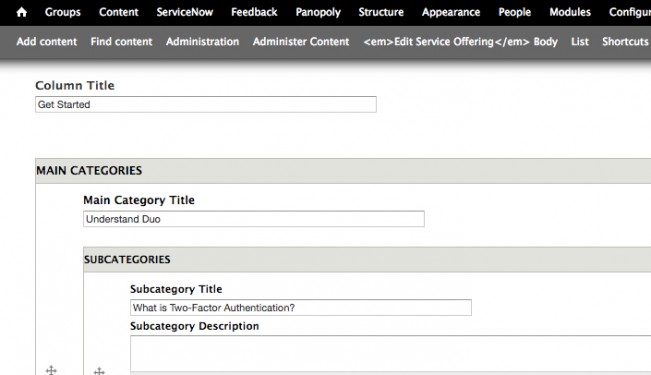
In Drupal, Columns in a self-help guide are made up of Main Guide Categories, Subcategories, and resource links.
In Drupal, Self-Help Guide subcategories contain links to resources and provide specific information for your Main Guide categories.

Resources

OverviewSelf-help guides on the Technology Help website offer step-by-step instructions and extra guidance to help you complete your tasks.

Self-Help Guides

This self-help guide is a starting point for faculty and staff who need to develop a course in Canvas.