
NameCoach is a user-recorded name pronunciation tool available in Canvas. The University is dedicated to providing a welcoming atmosphere and empowering individuals within its community. One of the ways to foster this on campus is to pronounce individuals' names correctly€"whether in the classroom, an advising meeting, or at a public event. Using NameCoach provides a way for staff and faculty to build an atmosphere of care and respect at the University by helping one another learn how to pronounce each other's names.
Add Your Name to NameCoach
- Log in to canvas.umn.edu.
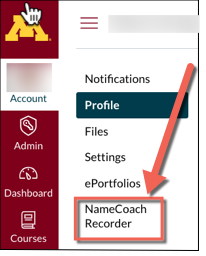
- Click Account in the Global Navigation bar.
- Click NameCoach Recorder.
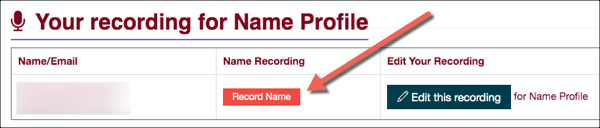
- You will go to Your recording for Name Profile page; click Record Name.
- A box will appear that will have your email, first name and last name in the fields at the top. You can choose to enter a phonetic spelling of your name in the Phonetic Spelling box. You can also leave this field blank.
- Choose to record your name either by having NameCoach call you to Record by phone or by recording your name using the Web Recorder (your computer's microphone). Follow the steps below according to how you would like to record your name:
Record by Phone
- Select the Phone option and enter your phone number into the text field provided.
- The phone number field will appear green if it has been entered correctly. It will appear red if the phone number has not been entered correctly.
- Click Call me now!
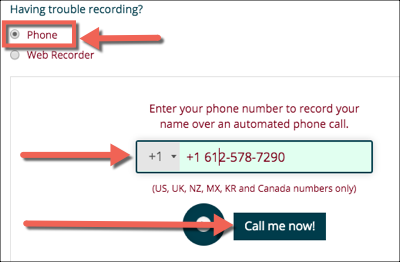
- Stay on the current computer screen. You will receive a call within a minute. Follow the directions on the phone call to record your name and save it to NameCoach.
- You can listen to your recording on the phone and re-record if needed. Once you are satisfied with your name recording, hang up but stay on the NameCoach page on your computer to wait for the recording to be uploaded to NameCoach.
- Once your recording has been successfully uploaded, a message will appear below the recording play button confirming that your recording has been uploaded:
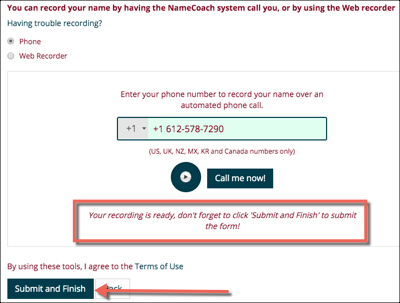
- You can play your recording by clicking the play icon.
- Click Submit and Finish. You will be returned to Your recording for Name Profile page on the computer, and there will be a play button in the Name Recording box.
Record with Web Recorder
- Select the Web recorder option.
- Click Record when you are ready to record your name.Notice: The prompt under the Record button will read €˜Ready', then €˜Set' and finally, €˜Record' - wait for the €˜Record' prompt before speaking.
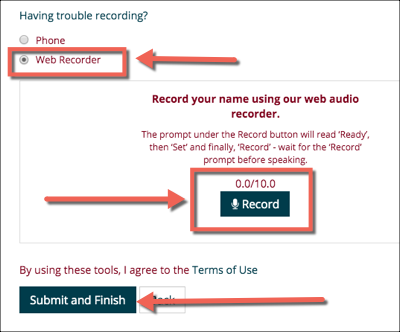
- When you are finished recording, click the stop button (a purple square).
- A play icon will appear next to the Record button once you have tried recording something. You can click the play icon to review your recording and re-record if necessary.
- Click Submit and Finish once you have a clear recording. You will be returned to Your recording for Name Profile page on the computer, and there will be a play button in the Name Recording box.
Edit Your Recording
You can edit your NameCoach recording any time.
- Navigate to Your recording for Name Profile page by following steps 1 - 7 above.
- Click Edit this recording.
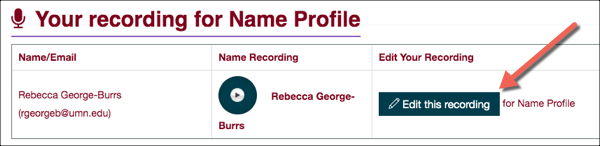
- Follow the directions above to record via your phone or your computer.
- Click Submit and Finish once you are happy with the recording.
Additional Information
For more help with NameCoach, please see NameCoach's self-help website.